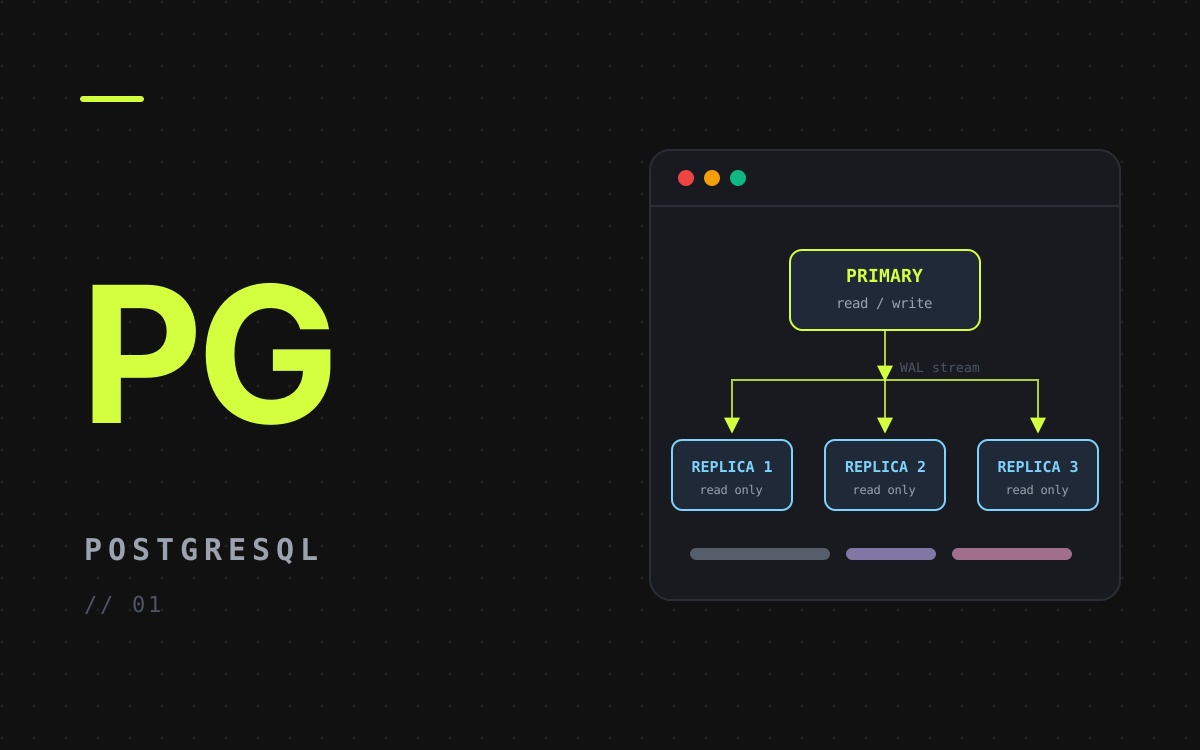
A single PostgreSQL container is a single point of failure, and every read competes with every write. Streaming replication fixes both: one primary accepts writes and streams its write-ahead log (WAL) to replicas, which stay in sync and serve read-only queries.
This post builds that setup with Docker Compose: one primary, three replicas and a persistent volume for each.
The Common Mistake
Many compose files online give each replica variables like POSTGRES_PRIMARY_HOST or POSTGRES_REPLICATION_USER and expect replication to just happen. The official postgres image doesn't know those variables (they come from other images, such as Bitnami's). The result is four independent, empty databases that never copy anything from the primary.
With the official image, replication needs three explicit steps:
- The primary needs a role with the
REPLICATIONattribute and apg_hba.confrule that lets replicas connect. - Each replica must start from a copy of the primary's data, made with
pg_basebackup. - Each replica must be told it is a standby and where its primary is.
pg_basebackup -Rwrites this for you.
Environment Variables
Set these in Portainer (or a .env file next to the compose file):
POSTGRES_USER=psql_demo
POSTGRES_PASSWORD=some_secure_password
POSTGRES_DB=psql_demo_db
POSTGRES_REPLICATION_USER=replicator
POSTGRES_REPLICATION_PASSWORD=replicator_password
Preparing the Primary
The official image runs any script in /docker-entrypoint-initdb.d/ the first time it creates the database. Save this as init-primary.sh next to the compose file:
#!/bin/bash
set -e

# Role the replicas log in with, plus one replication slot per replica so the
# primary keeps the WAL a replica still needs, even while it is offline.
psql -v ON_ERROR_STOP=1 --username "$POSTGRES_USER" --dbname "$POSTGRES_DB" <<-EOSQL
  CREATE ROLE ${POSTGRES_REPLICATION_USER} WITH REPLICATION LOGIN PASSWORD '${POSTGRES_REPLICATION_PASSWORD}';
  SELECT pg_create_physical_replication_slot('replica_1');
  SELECT pg_create_physical_replication_slot('replica_2');
  SELECT pg_create_physical_replication_slot('replica_3');
EOSQL

# Allow replication connections from the Docker network.
echo "host replication ${POSTGRES_REPLICATION_USER} all scram-sha-256" >> "$PGDATA/pg_hba.conf"
Init scripts only run when the data volume is empty. If the primary already has data, run the SQL by hand and add the pg_hba.conf line yourself, then reload with SELECT pg_reload_conf();.
The Compose File
x-replica: &replica
  image: postgres:17
  user: postgres
  environment: &replica-env
    PGUSER: ${POSTGRES_REPLICATION_USER}
    PGPASSWORD: ${POSTGRES_REPLICATION_PASSWORD}
  command:
    - bash
    - -c
    - |
      # First start only: clone the primary into the empty volume.
      if [ ! -s "$$PGDATA/PG_VERSION" ]; then
        pg_basebackup --host=postgres --pgdata="$$PGDATA" \
          --slot="$$REPLICA_SLOT" --write-recovery-conf \
          --wal-method=stream --checkpoint=fast --progress
        chmod 0700 "$$PGDATA"
      fi
      exec postgres
  depends_on:
    postgres:
      condition: service_healthy
  networks:
    - postgres-net
  restart: always

services:
  postgres:
    image: postgres:17
    container_name: postgres
    environment:
      POSTGRES_USER: ${POSTGRES_USER}
      POSTGRES_PASSWORD: ${POSTGRES_PASSWORD}
      POSTGRES_DB: ${POSTGRES_DB}
      POSTGRES_REPLICATION_USER: ${POSTGRES_REPLICATION_USER}
      POSTGRES_REPLICATION_PASSWORD: ${POSTGRES_REPLICATION_PASSWORD}
    ports:
      - '5432:5432'
    volumes:
      - postgres-data:/var/lib/postgresql/data
      # Use an absolute host path when deploying from Portainer's web editor.
      - ./init-primary.sh:/docker-entrypoint-initdb.d/init-primary.sh:ro
    healthcheck:
      # TCP check: during first-time init the server only listens on a socket,
      # so this stays unhealthy until the init script has finished.
      test:
        - CMD-SHELL
        - pg_isready -h 127.0.0.1 -U $${POSTGRES_USER} -d $${POSTGRES_DB}
      interval: 5s
      timeout: 5s
      retries: 10
    networks:
      - postgres-net
    restart: always

  postgres-replica-1:
    <<: *replica
    container_name: postgres-replica-1
    environment:
      <<: *replica-env
      REPLICA_SLOT: replica_1
    volumes:
      - postgres-replica-1-data:/var/lib/postgresql/data

  postgres-replica-2:
    <<: *replica
    container_name: postgres-replica-2
    environment:
      <<: *replica-env
      REPLICA_SLOT: replica_2
    volumes:
      - postgres-replica-2-data:/var/lib/postgresql/data

  postgres-replica-3:
    <<: *replica
    container_name: postgres-replica-3
    environment:
      <<: *replica-env
      REPLICA_SLOT: replica_3
    volumes:
      - postgres-replica-3-data:/var/lib/postgresql/data

networks:
  postgres-net:
    driver: bridge

volumes:
  postgres-data:
  postgres-replica-1-data:
  postgres-replica-2-data:
  postgres-replica-3-data:
What each part does:
postgres:17, notlatest. Pin the major version. A major upgrade cannot read an older data directory, and since PostgreSQL 18 the official image stores data under/var/lib/postgresql/18/docker, so a volume mounted at/var/lib/postgresql/datawould no longer hold the data.- Defaults do the rest. Since PostgreSQL 10,
wal_level=replica,max_wal_senders=10andhot_standby=onare the defaults, so the primary needs no extra settings. pg_basebackup -Rcopies the primary and writesstandby.signalplus the connection settings, so the replica starts in standby mode and keeps streaming.--slotties each replica to its replication slot.$$escapes the$so the variable is read inside the container, not by Compose.chmod 0700: PostgreSQL refuses to start if its data directory is readable by other users.- Healthcheck plus
depends_on: replicas wait until the primary is up and its init script has run. - Persistent storage: every service has its own named volume, so data survives container restarts and re-creation.
Deploying on Portainer
The compose file mounts init-primary.sh from disk, and the web editor has no place for that file. Copy the script to the Docker host (for example /opt/postgres/init-primary.sh), change the mount to that absolute path, and paste the compose file into a new stack. Then add the environment variables above in the stack settings.
On the first deploy, the primary initialises and each replica clones it. Later restarts skip both steps, because the volumes are no longer empty.
Checking That It Works
On the primary, every replica should appear as streaming:
docker exec -it postgres psql -U psql_demo -d psql_demo_db \
  -c "SELECT application_name, client_addr, state, sync_state FROM pg_stat_replication;"
Each replication slot should be active:
SELECT slot_name, active FROM pg_replication_slots;
On a replica, pg_is_in_recovery() returns true, and writes are rejected:
docker exec -it postgres-replica-1 psql -U psql_demo -d psql_demo_db \
  -c "SELECT pg_is_in_recovery();"
Create a table on the primary, insert a row, and select it from any replica. It should appear within a moment.
Things to Know Before Production
- Replication is asynchronous. A replica can be slightly behind, so read your own writes from the primary.
- Replicas are read-only. Send writes to
postgresand spread reads across the replicas, in your app or with a pooler such as PgBouncer or Pgpool-II. - There is no automatic failover. If the primary dies, promote a replica with
SELECT pg_promote();and point the others at it. Tools like Patroni or repmgr automate this. - Slots keep WAL. A replica that stays offline makes the primary keep WAL indefinitely, which can fill its disk. Drop the slot of a replica you remove, or set
max_slot_wal_keep_size. - Keep secrets out of Git. Use Portainer's environment variables or Docker secrets, and use strong passwords.
- Replicas are not backups. A
DROP TABLEreplicates instantly, so keep regularpg_dumpor WAL-archive backups as well.